Your voice agent feels slow. How to find the slow step.
By Andrew
“Can you check my policy?” the caller asks.
Silence. One second. Three. Five.
“Hello? Are you there?”
The agent comes back with the answer, right on top of the caller. Now both talk at once. The caller sighs and asks for a person.
Your dashboard says the average reply time is 1.6 seconds. That sounds fine. So where did five seconds come from?
This guide shows what callers really wait for and why the average hides it. It shows how to find the slow step on your own calls. Then it shows where SignalMD finds it for you.
What the caller waits for
In normal talk, people answer within a fraction of a second. A long gap on a call feels like a dropped line.
The wait a caller feels runs from the moment they stop talking to the moment the agent starts. Several steps fill it.
- Deciding the caller is done. The agent waits for a short silence to be sure the caller has finished.
- Speech to text. The words are written down.
- Lookups. The agent calls a tool: a calendar, a policy system, a CRM.
- Writing the reply. The model writes its answer. A long prompt or a big model is slower.
- Text to speech. The reply becomes a voice.
Why the average hides it
Most replies are fast. A few are very slow. The average mixes them into a number that looks fine.
So look at the slow end, not the middle. Ask: how long did the slowest 1 in 10 replies take? Retell, for example, shows each call’s slow end, and splits the wait into its parts.
But even the slow end does not say where. A slow reply after “hello” and a slow reply after a lookup have different fixes.
Find the slow step by hand
- Take 50 calls from the last week. Mix good and bad endings.
- List every reply that took over 3 seconds. Your platform’s call record usually has a time for each word, so you can measure the gap.
- Write down what came just before. A tool call? A long reply? The first reply of the call?
- Group the slow replies by step and tool. One group is usually much bigger than the rest.
- Fix that group first. Then count the slow replies again on the new version.
The fix for each cause
| Slow replies come after | Try this |
|---|---|
| A lookup | Say a short line first ("Let me check that"). Speed up or cache the tool. Set a time limit with a fallback line. |
| Any reply, all through the call | Shorten the prompt. Try a smaller or faster model. |
| The caller stops talking | Shorten the silence the agent waits for. Watch that it does not start cutting callers off. |
| Long answers | Make the first sentence short, so speech starts sooner. |
| Calls from far away | Use a phone number in the caller's region. |
A shorter wait for silence is a trade. Too short, and the agent talks over callers who pause to think. See callers interrupted when they pause.
Where doing it by hand breaks
Measuring gaps from word times is slow work. Fifty calls can mean a thousand replies.
Tying each slow reply to its step and tool takes the full call record, not only the transcript.
And after the fix, you need the same count on the new version. Otherwise “it feels faster” is the only proof.
Where SignalMD helps
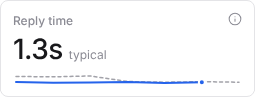
SignalMD tracks a typical reply time across your calls, next to the numbers that matter to callers.
It also shows each tool’s slow runs, so the slow step has a name.
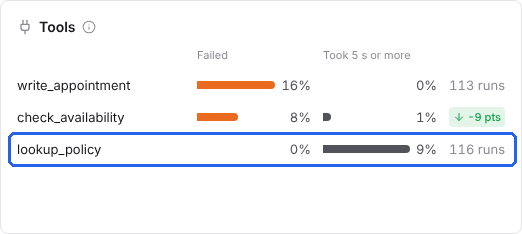
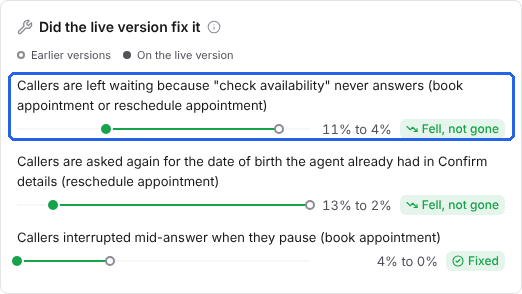
When callers are left waiting on a tool, it becomes an issue with its place and calls. After you ship a fix, you see whether it worked on real calls. Here is one for a different tool, the availability check.
Want to find the slow step on your own calls? Try it free or book a call. Short videos are on our YouTube channel.
Common questions
What is good latency for a voice agent?
Aim for replies that feel like normal talk, about a second or less. Then check the slow end, not only the average.
How do I reduce voice agent latency?
Find which step the slow replies follow first. Then fix that step: a lookup, the model, the wait for silence or long answers.
Why does my voice agent feel slow when the average is fine?
A few very slow replies hide inside a good average. Those are the ones callers remember.