How many calls do you need to know a voice agent fix worked?
By Andrew
You fix your voice agent on Monday. Last week the problem was on 5 of 40 calls. This week it is on 3 of 40. Did the fix work?
You cannot tell yet. With 40 calls, a move from 5 to 3 happens by chance all the time. Trust that number and you may keep a fix that did nothing. Or undo one that worked.
This guide shows how to know a voice agent fix worked, without any tool: what to count, how many calls you need, and where the count goes wrong. Then it shows where SignalMD does the count for you.
A good day proves nothing
Call results move even when nothing changes. Some days bring harder callers. Some days bring more of one kind of call.
So a drop after a fix can be noise. The question is not “did the number go down?” It is “did it go down by more than it moves on its own?”
Count before and after, the same way
Here is how, step by step.
- Pick one number before you change anything. For example, the share of calls where the agent asks for the date of birth twice.
- Write down when the change went live. Use the version number. Calls before it are group A. Calls after it are group B.
- Judge every call the same way. Same question, same rule, on both sides. A new way to judge moves the number by itself.
- Count only calls that could show the problem. A caller who hangs up at the greeting never reached the date of birth step. Leave those calls out on both sides.
- Compare the two shares. Then check that you have enough calls to trust the gap.
Why it works: the agent is the only thing that differs between A and B. You hold everything else the same.
Where it fails: you cannot hold your callers the same. More on that below.
How many calls you need
Two things decide it: how common the problem is, and how big a change you expect. A big drop in a common problem shows fast. A small drop, or a rare problem, takes many calls.
These are the standard numbers for comparing two shares. With them, you see a real change of that size about 4 times in 5. You see a change that is not there about 1 time in 20.
A rule of thumb: say the problem is on 1 call in 5, and you expect the fix to halve it. Wait for about 200 calls on the new version.
Why it works: you choose the size of the change before you look. A lucky day cannot change your mind.
Where it fails:
- Rare problems. At 1 call in 100, you need thousands of calls. Make a test from a call that showed the problem, and count live calls over a longer time.
- Peeking. If you look every hour and stop when it looks good, you will see fixes that did nothing. Pick the number of calls first. Then look.
Compare the same kind of calls
The count expects the same callers on both sides. They are rarely the same.
- Monday brings different calls than Friday.
- A billing letter goes out, and half the calls are about bills.
- A holiday week brings new callers who do not know your steps.
When the mix changes, the number moves. Your fix gets the credit or the blame.
What to do: split the count by why people call. Compare booking calls with booking calls. Use full weeks on both sides, so each weekday is in each.
Where it fails: each split has fewer calls. Split too far, and no part has enough calls to trust. Split on one or two things, not ten.
Check that nothing else got worse
A fix can work and still break something else. One change can break a path you did not touch, as our post on test coverage shows. So count two numbers:
- The problem you fixed. Did it go down?
- One number for the whole agent. For example, the share of callers who got what they called for. Did it stay the same or go up?
Choose both before the change. If you look at twenty numbers, one of them will move by chance. It will look like a finding.
Lower is not the same as fixed
After enough calls, a fix ends in one of five states. Name them, so nobody reads “lower” as “fixed”.
“Lower, not gone” is the one teams miss. The problem is less common, so the work looks done. Read the calls that still show it. They often have a second cause.
Let SignalMD do the count
SignalMD does this count on your live calls, for each new version of your agent. You do not count by hand.
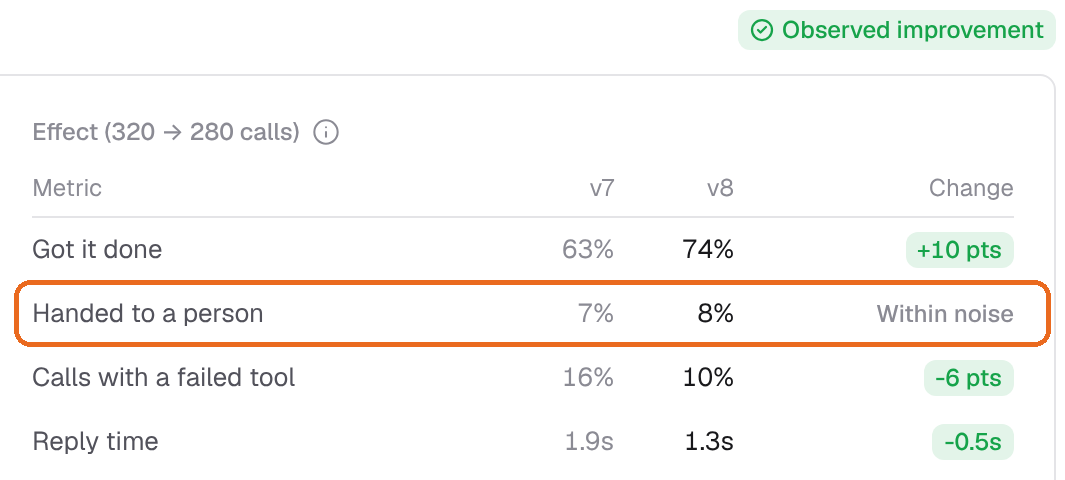
Each number says if it moved by more than its normal swing. Until a version has enough calls, it says “Not enough calls” and gives no verdict.
Each problem also gets its own answer by version.
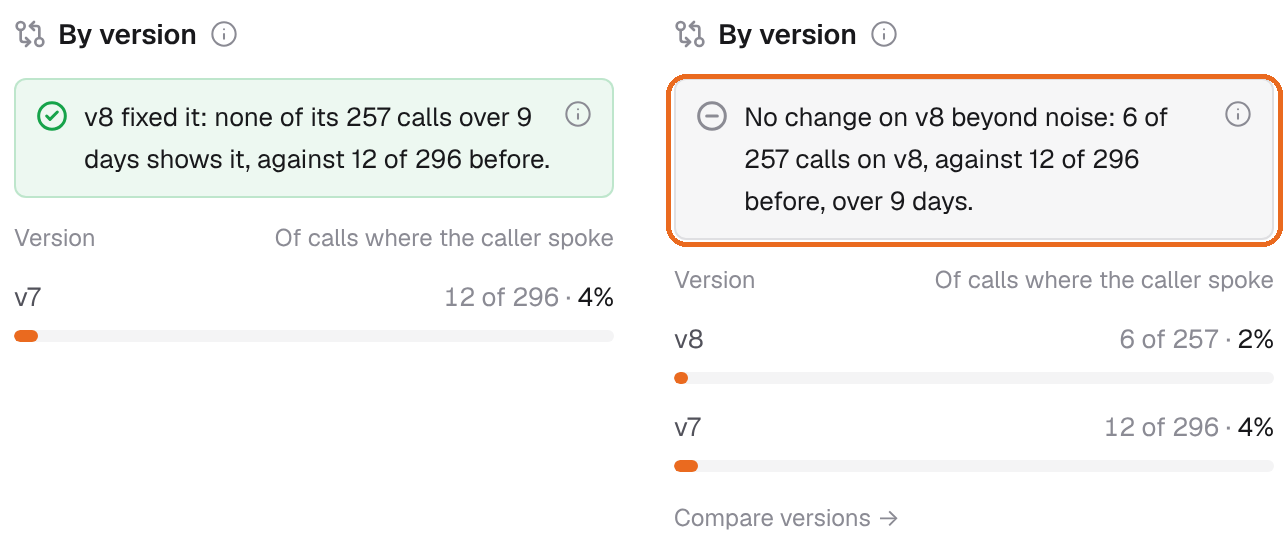
Half as often sounds like a win. With these numbers it is still inside the normal swing, so it does not count as fixed.
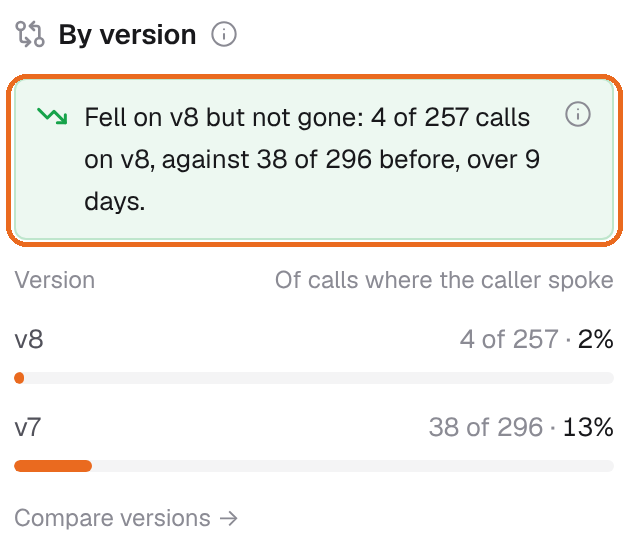
A problem that is lower but not gone says so. You know to read the calls that still show it.
Want to see this on your own calls? Try it free.
Common questions
How long should I wait after a fix?
Until you have the number of calls you chose before the change. Use full weeks, so each weekday is in the count.
Can test calls tell me a fix worked?
Test calls tell you the change runs. Only live calls tell you what it did for your callers.
What if my agent gets few calls?
Count over a longer time, and expect to see only big changes. Make tests from real calls to guard the paths you fixed.
A fix is a guess until enough calls say it worked. Count the same way, wait for enough calls, and check that nothing else got worse. To see this on your own calls, try it free or book a call. For short walkthroughs, see our YouTube channel.