Does an AI voice agent hurt your contact rate?
By Andrew
You move your outbound calls from people to an AI voice agent. Two weeks later, fewer calls reach a person. The team says: “People hate talking to robots.”
Maybe. But most of the time, the AI is not the reason.
This guide shows where an AI agent can hurt your contact rate, and where it cannot. It also shows how to check your own calls without any tool. Then it shows where SignalMD does the check for you.
The answer comes before anyone speaks
Contact rate is simple. It is the share of dialed calls that reach a live person.
Now look at what happens before your agent says a word. The carrier checks your number. It may show “Spam Likely” on the screen. The phone may screen the call. The person sees a number they do not know.
Then they decide. They have not heard your agent yet.
So a human voice and an AI voice get the same pickup rate. The caller ID, the label and the screen decide it.
Where an AI agent can hurt
The AI can still cost you contacts. It does it in three places.
It dials too much. An AI agent makes calls cheap. So teams call more people, more often, from fewer numbers. Carriers notice. Your numbers get a spam label, and fewer people pick up. This is the biggest way AI hurts contact rate. It is the volume, not the voice.
It fails the call screen. New phones can answer an unknown call first. The screen asks: “Who is calling, and why?” A person hears the answer and decides. An agent that waits, rambles or says “Hello?” gets dropped.
It loses the first seconds. A long pause after “Hello”. A greeting that sounds like a script. A question nobody asked. People hang up in the first few seconds when the call feels slow or strange.
| Changes with AI | Does not change with AI |
|---|---|
| How many calls you can make | The number the person sees |
| How the agent answers a call screen | A spam label already on your number |
| The first five seconds after pickup | Whether people answer unknown numbers |
Most people want the job done
Ask people in a survey and many say they prefer a human. But on a real call, people act on something else.
In our experience, most people do not care who answers. They care that the thing they need gets done. Book the slot. Move the date. Answer the question. If the agent does it fast, they stay.
About 7 in 10 people say they are open to AI if they can still reach a person. That last part matters.
A small group does not want to talk to a bot at all. That group is real, but it is small. Treat it as an edge case with its own path. Do not design the whole call around it.
Find the friction, not the robot
When calls go wrong after pickup, look for friction. Friction is any moment the person has to work to get what they need.
Read the calls that end in the first 30 seconds. Look at the last thing the person said. You will see patterns like these:
- “Who is this?” and the agent does not say clearly.
- The agent asks a question the person already answered.
- The person asks for another day, and the agent cannot move it.
- A long silence while the agent looks something up.
- The agent talks over the person.
Each one has a fix. A clear first line. One question at a time. A tool that can reschedule. A short filler line before a slow lookup.
Give people who say no a clear path
Some people will say “I don’t want to talk to a robot.” Plan for that line before it happens.
- Offer a person. Transfer when someone is free. If not, book a callback with a time.
- Respect “don’t call me”. Add the number to your own do-not-call list the same day. US rules give you up to 10 business days to honor an opt-out. Do not wait that long.
- Keep it short. One polite line, then end the call.
One more rule. In the US, an AI voice counts as an “artificial” voice under the main calling law. So the consent rules for those calls apply to your agent. Check your setup with your lawyer.
Check it on your own calls
You can test the “AI hurts contact rate” idea on your own calls. You need the calls from before and after the switch. To choose how many calls to count, see how many calls you need to trust a change.
- Take 100 dialed calls from each period.
- For each call, write who answered: a person, voicemail, a call screen, a phone menu, or nobody.
- Compare the share of each kind.
If “nobody” and “voicemail” grew, the change is on the phone side. Look at your numbers and how much you dial. If “a person” stayed the same but fewer calls got the job done, the change is in your agent. Look for friction.
Where checking by hand fails
This works for 100 calls. It gets hard fast after that.
A call screen and a voicemail greeting look alike in a transcript. A phone menu can sound like a person. And you need the same split every week, not once.
Where SignalMD helps
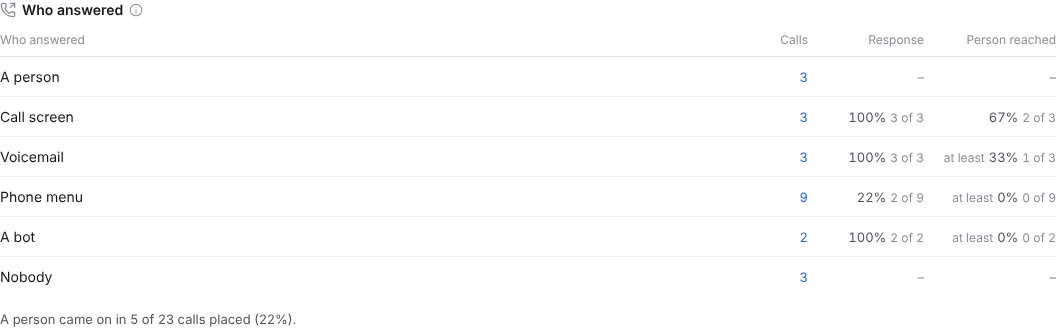
SignalMD shows who answered every call your agent placed. It can be a person, a call screen, or a screen and then a person. It can also be voicemail, a phone menu, another company’s bot, or nobody. Each call shows the line that decided it.
You see the share of each kind across your calls. So you can tell a market problem from an agent problem in a few seconds.
Want to see who answers your agent’s calls? Try it free or book a call. Short videos are on our YouTube channel.
Common questions
Do people hang up on AI voice agents?
A small group does. Most people hang up when the first seconds feel slow or strange, not because the voice is AI. Offer a person to anyone who asks.
Does AI calling get your number labeled as spam?
The voice does not. The volume can. Many calls from few numbers, to the same people, can get your numbers labeled.
How do you tell if the AI or the market caused the drop?
Split your calls by who answered, before and after the switch. If “nobody” and voicemail grew, look at the phone side. If people answered as often but fewer calls got the job done, look at your agent.